# Selenium JavaScript Python C#, Cypress, TestCafe, Playwright, Squish selector generation has been added to Selenideium Element Inspector v2.0
Awesome news!
The new version of Selenideium Element Inspector can be downloaded from the [Chrome web store](https://chrome.google.com/webstore/detail/selenideium-element-inspe/mgfhljklijclnfeglclagdeoiknnmnda).
So let's have a look, what are the **new features**
- ** Automatically generating complete copy-pastable line of code for the following frameworks**:
- **Selenium JavaScript**
- **Selenium Python**
- **Selenium C#**
- **Cypress**
- **TestCafe**
- **Playwright**
- **Squish**
and of course also for
- **Selenide**
- **Selenium Java**
- **Provide an option to select the testing frameworks for which selectors will be generated**
[Download Selenideium Element Inspector v2.0](https://chrome.google.com/webstore/detail/selenideium-element-inspe/mgfhljklijclnfeglclagdeoiknnmnda), and have fun.
[Please leave a review](https://chrome.google.com/webstore/detail/selenideium-element-inspe/mgfhljklijclnfeglclagdeoiknnmnda) in case you find the plugin useful!
[Buy me a coffee in case you save time by using Selenideium Element Inspector!](https://buymeacoffee.com/mikiszeles)😊
As usual, we will continue with the implementation details.
## Refactor again
In case you had a look at the code, you could see we still have some duplication, so it is time to get rid of that.
As my plan is to add support for many testing frameworks, it makes sense in case I create a common class for them. Before we do that, I have replaced variable declaration vars with lets inspired by [this](https://maximilianocontieri.com/code-smell-116-variables-declared-with-var#ckzyznrsc01akjznv24wc56m8) article.
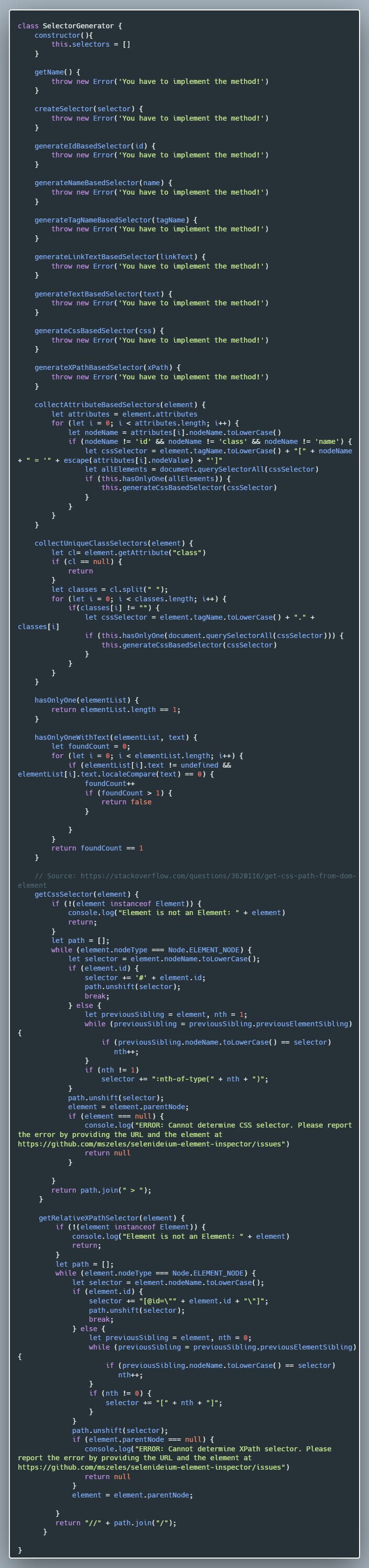
So let's create SelectorGenerator class:
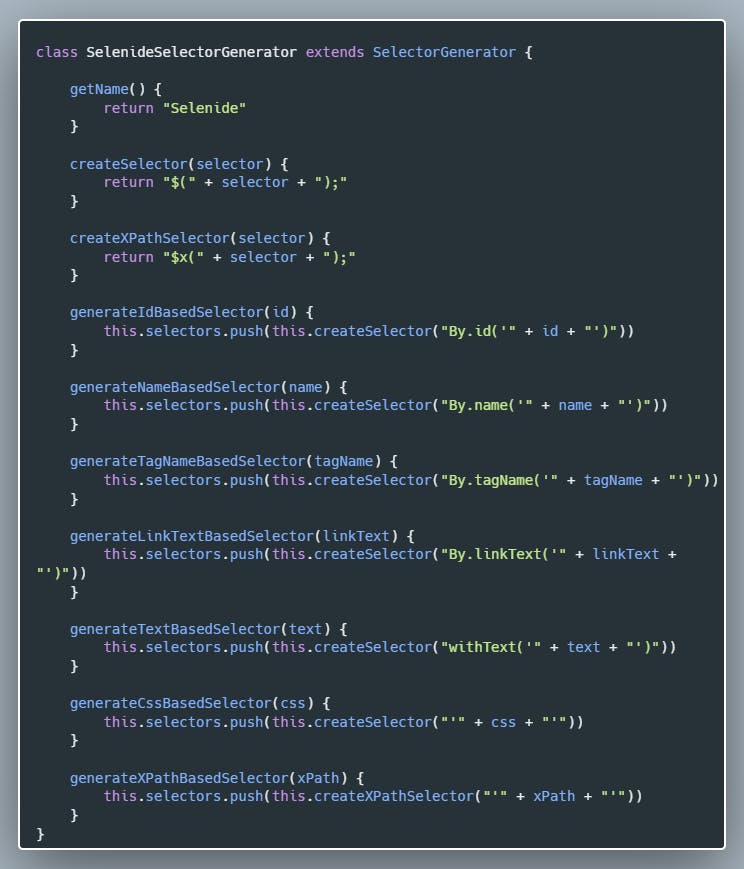
 Let's create the Selenide specific subclass:
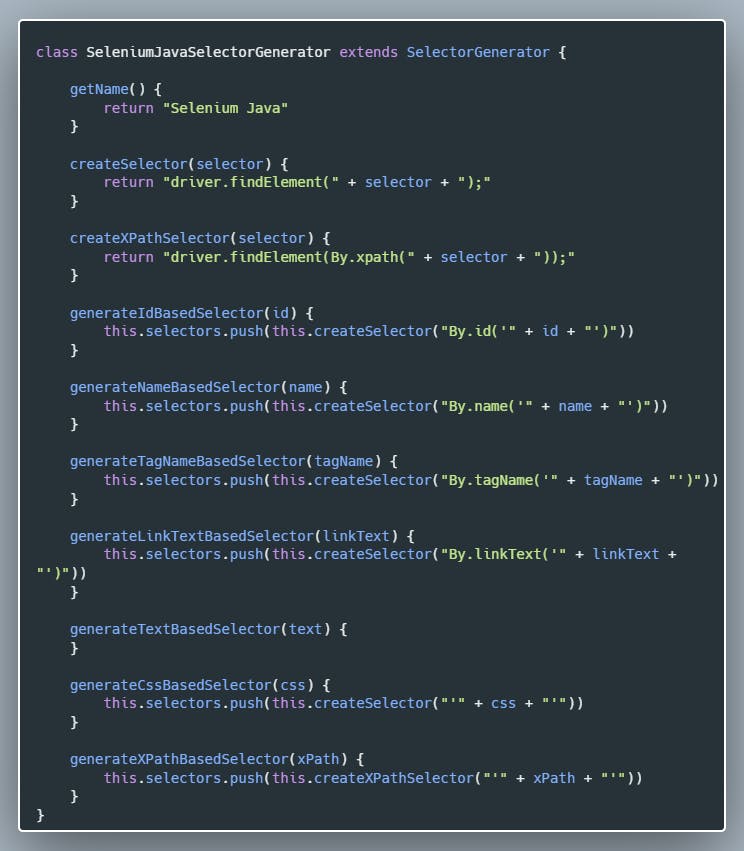
 Create the Selenium Java-specific class:
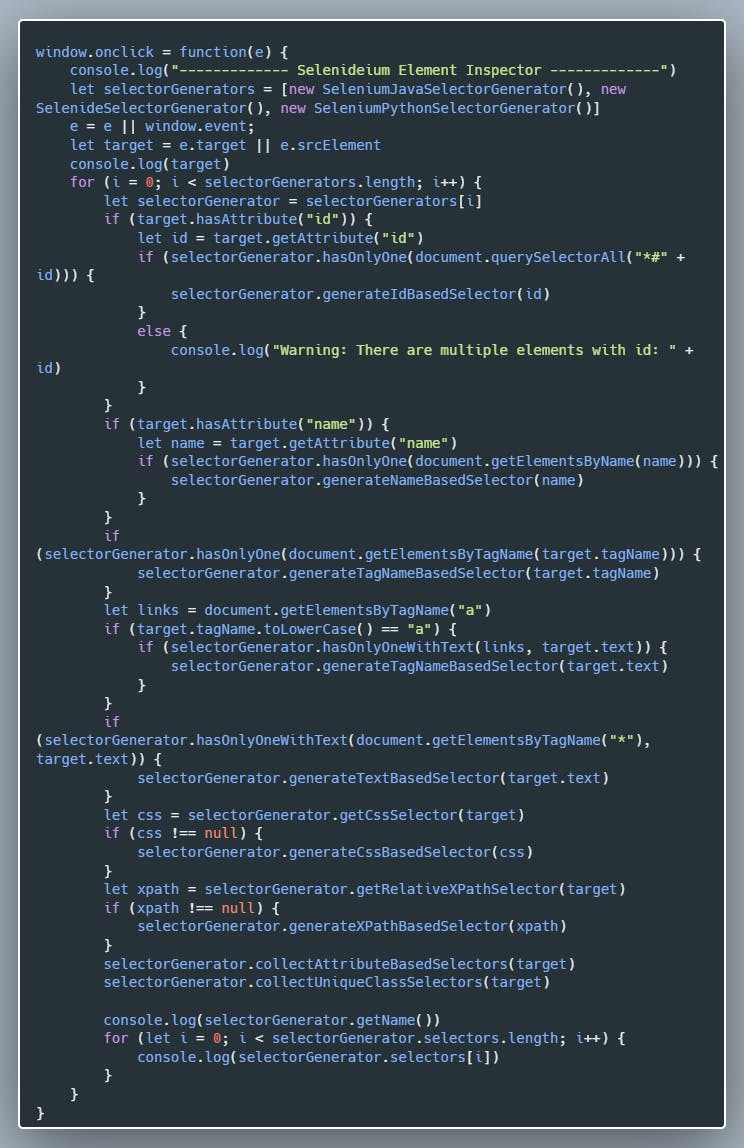
 And as a final step, let's refactor *content.js* to use the new classes:
 And that's it. It is very important to keep your codebase clean with frequent refactoring.
I wanted to separate the classes into their own JavaScript files, but as I am new to JavaScript I miserably failed with that. After a few hours, I gave up. I constantly got the following error: *> SyntaxError: Cannot use import statement outside a module I tried to specify "type": "module", exporting, importing classes in different ways*, but I could not solve it. If you could help me, that would be awesome.
Let's start feature development
## Adding Selenium Python support
It is so easy to add support for any testing framework:
And that's it. It is very important to keep your codebase clean with frequent refactoring.
I wanted to separate the classes into their own JavaScript files, but as I am new to JavaScript I miserably failed with that. After a few hours, I gave up. I constantly got the following error: *> SyntaxError: Cannot use import statement outside a module I tried to specify "type": "module", exporting, importing classes in different ways*, but I could not solve it. If you could help me, that would be awesome.
Let's start feature development
## Adding Selenium Python support
It is so easy to add support for any testing framework:
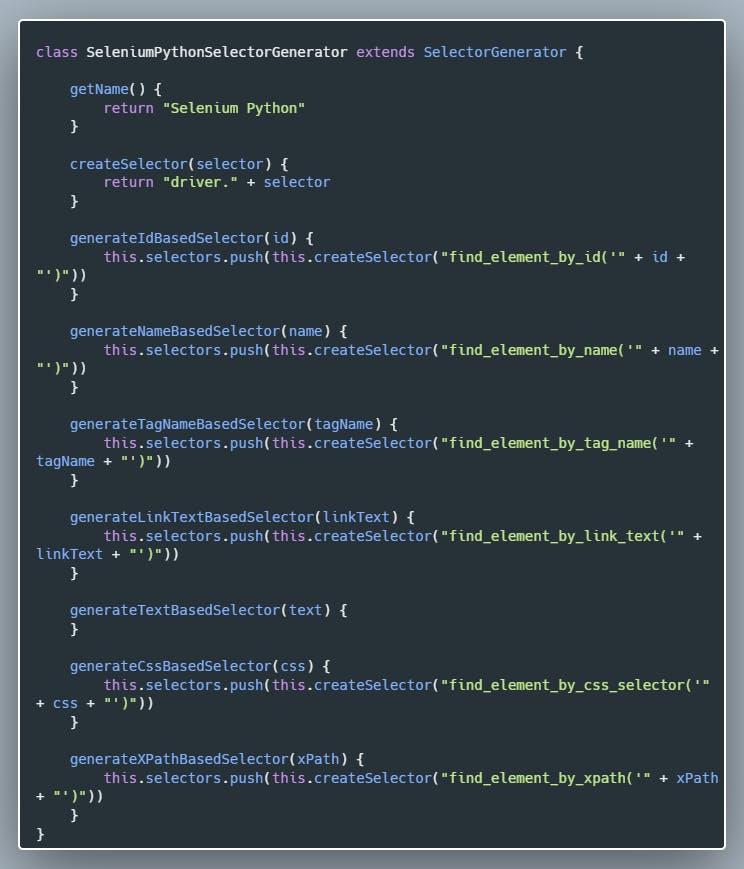 ## Adding Selenium C# support
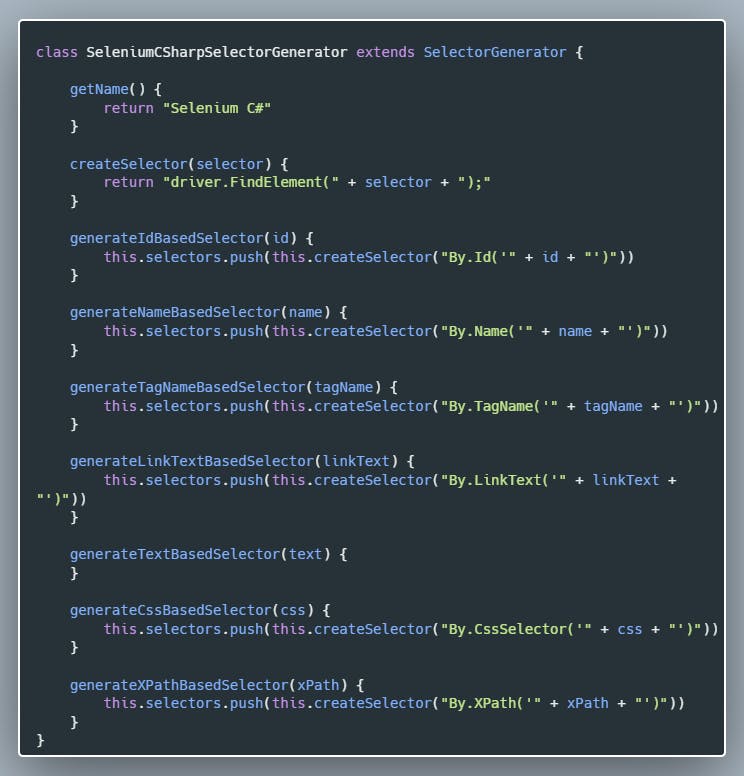 ## Adding Selenium JavaScript support
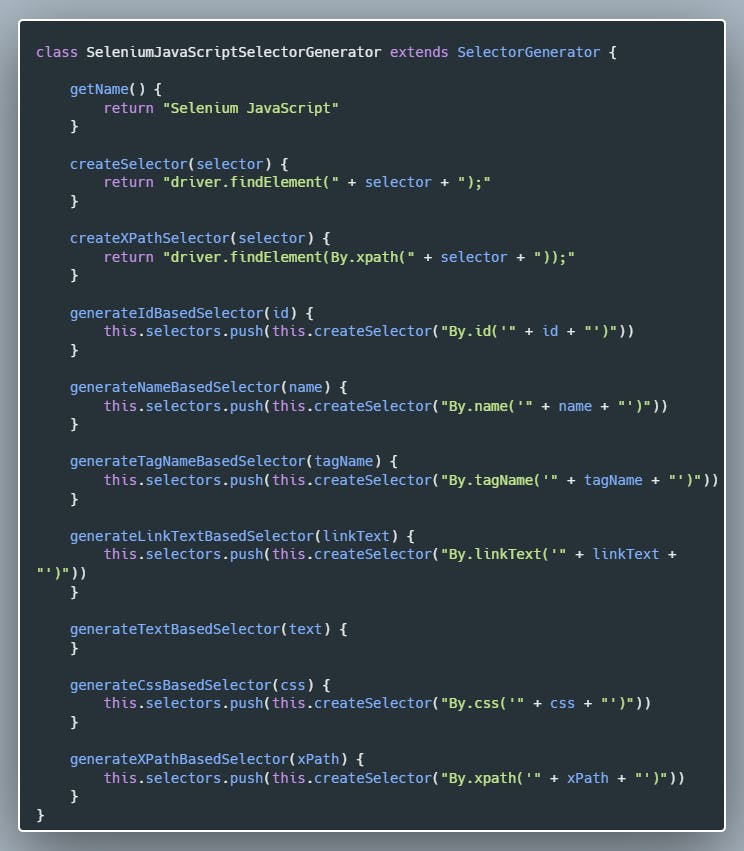 Adding Cypress support
So let's see how we can add Cypress support:Cypress Selector Generator Class
Adding Cypress support
So let's see how we can add Cypress support:Cypress Selector Generator Class 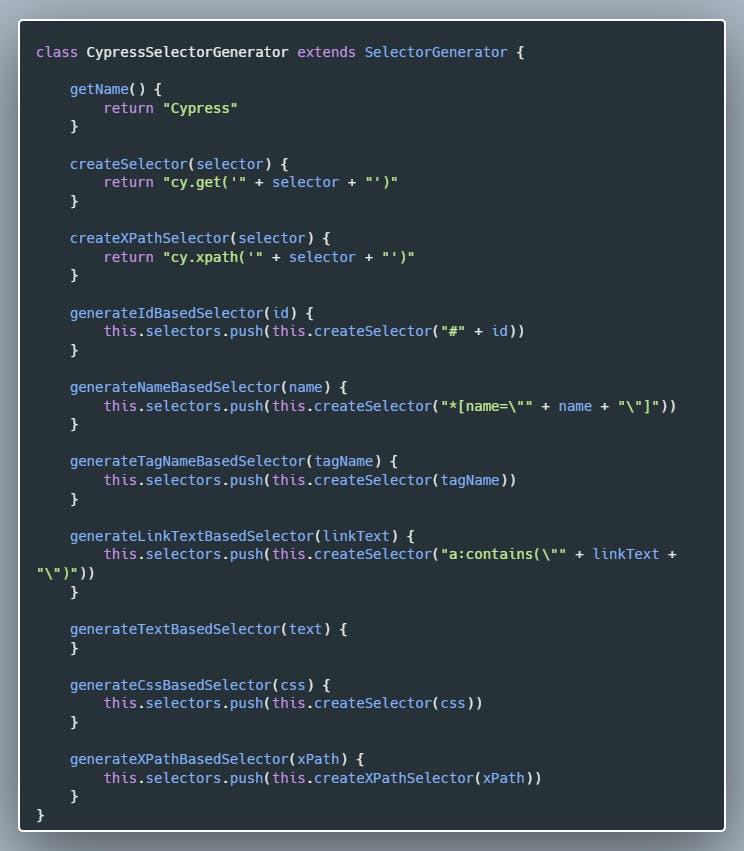 Adding Playwright support
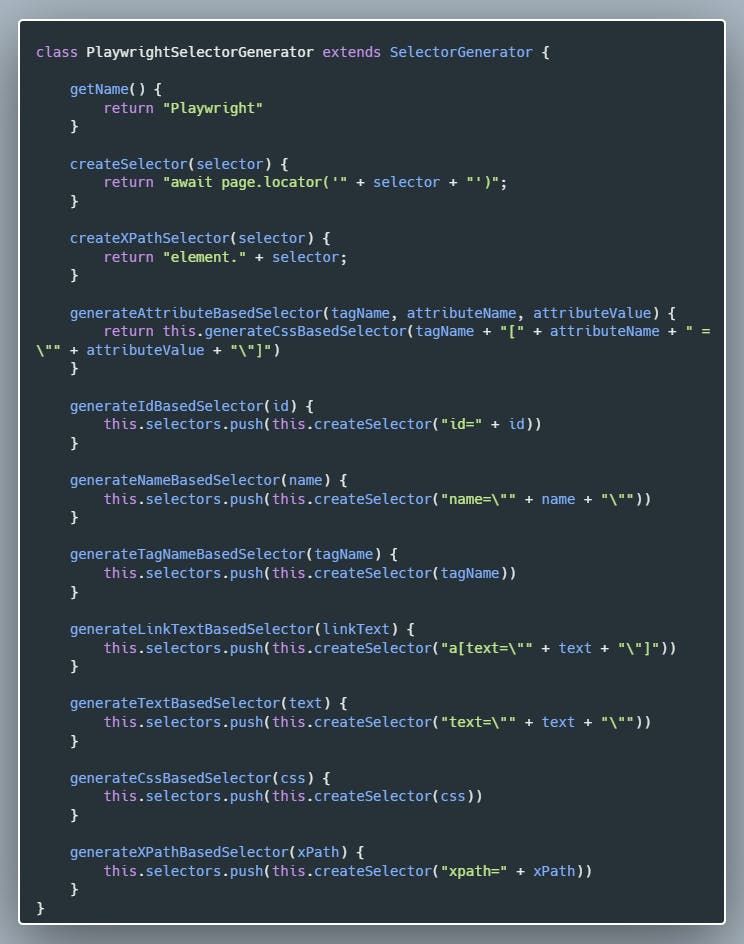
Adding Playwright is as easy as adding any other framework support:
Adding Playwright support
Adding Playwright is as easy as adding any other framework support:
 Adding Squish and TestCafe support
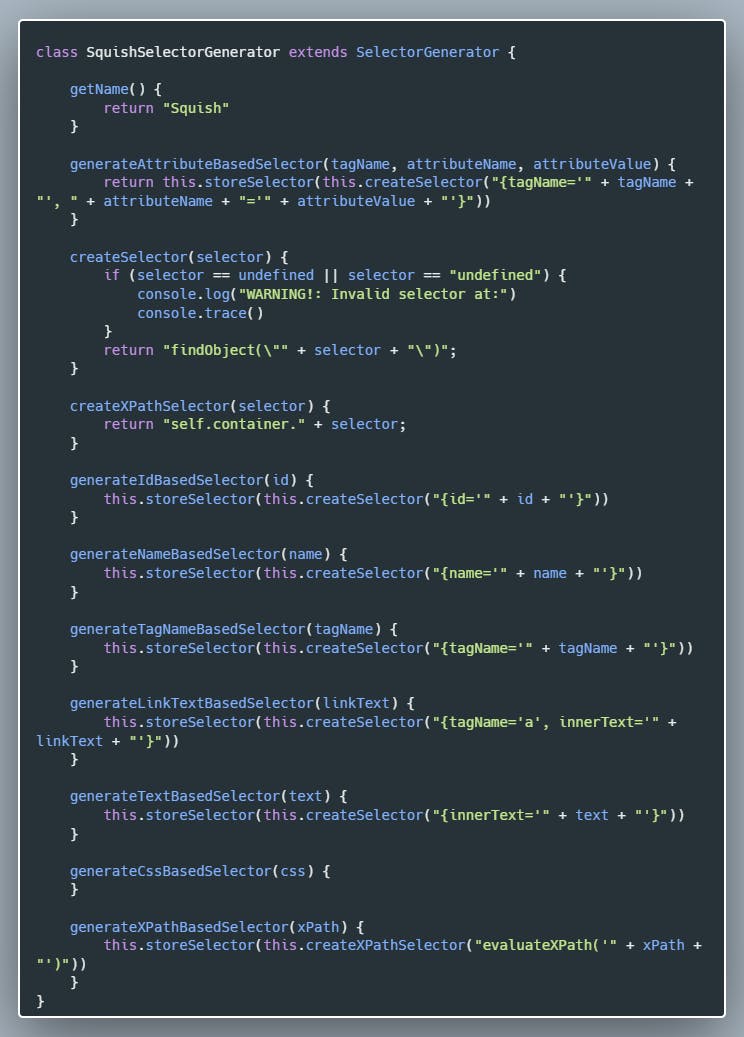
I was talking with my colleagues from the company and I found out they are using Squish and TestCafe, so it was no question whether I will implement them or not.
Adding Squish and TestCafe support
I was talking with my colleagues from the company and I found out they are using Squish and TestCafe, so it was no question whether I will implement them or not.
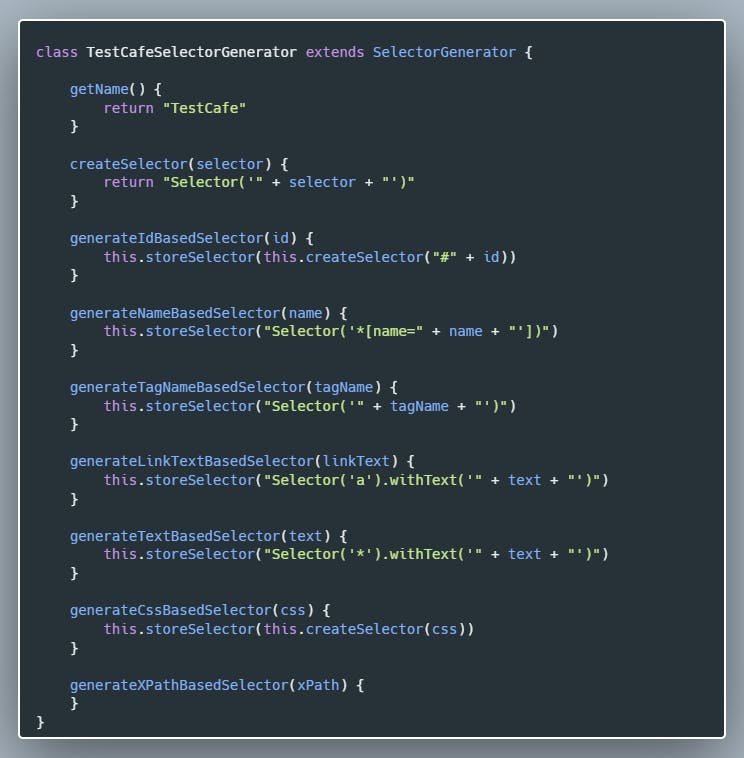
 Adding TestCafe:
 And that's it. We have added support for all testing frameworks planned for Selenideum Element Inspector v2.0. In case I missed your favourite framework, just create a ticket on [GitHub](https://github.com/mszeles/selenideium-element-inspector/issues), and I will implement it as soon as I can. 😊
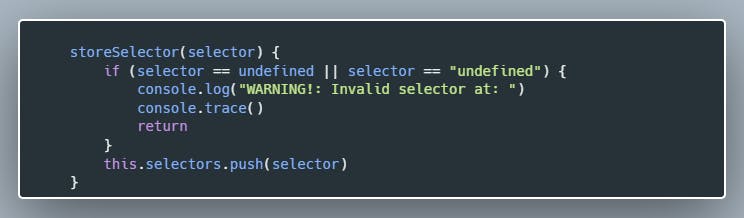
After this, a few hours of debugging came. For some unknown reason, one selector for each framework appeared as "undefined". I filled the code with logs and also debugged the code without any success.
In the end, I refactored storing the selector into its own method, so I can log the stack trace in case I get an undefined value:
And that's it. We have added support for all testing frameworks planned for Selenideum Element Inspector v2.0. In case I missed your favourite framework, just create a ticket on [GitHub](https://github.com/mszeles/selenideium-element-inspector/issues), and I will implement it as soon as I can. 😊
After this, a few hours of debugging came. For some unknown reason, one selector for each framework appeared as "undefined". I filled the code with logs and also debugged the code without any success.
In the end, I refactored storing the selector into its own method, so I can log the stack trace in case I get an undefined value:
 In the end, I found out I accidentally stored the return value of one of the generator functions which stores the selectors and it has no return value.
Let's do something more interesting to close this article
## Configuring for which framework to generate selectors
As we have added Selenide, Selenium Java, Selenium Python, Selenium C#, Selenium JavaScript, Cypress, TestCafe and Playwright support we are logging too many selectors unnecessarily. In order to avoid that, let's make the frameworks selectable.
There are 3 steps we have to do:
- Create an options page and add checkboxes for the frameworks to the UI
- Store and load settings in chrome storage
- Log selectors only for the selected frameworksCreate an options page and add checkboxes for the frameworks to the UI
## Create an options page and add checkboxes for the frameworks to the UI
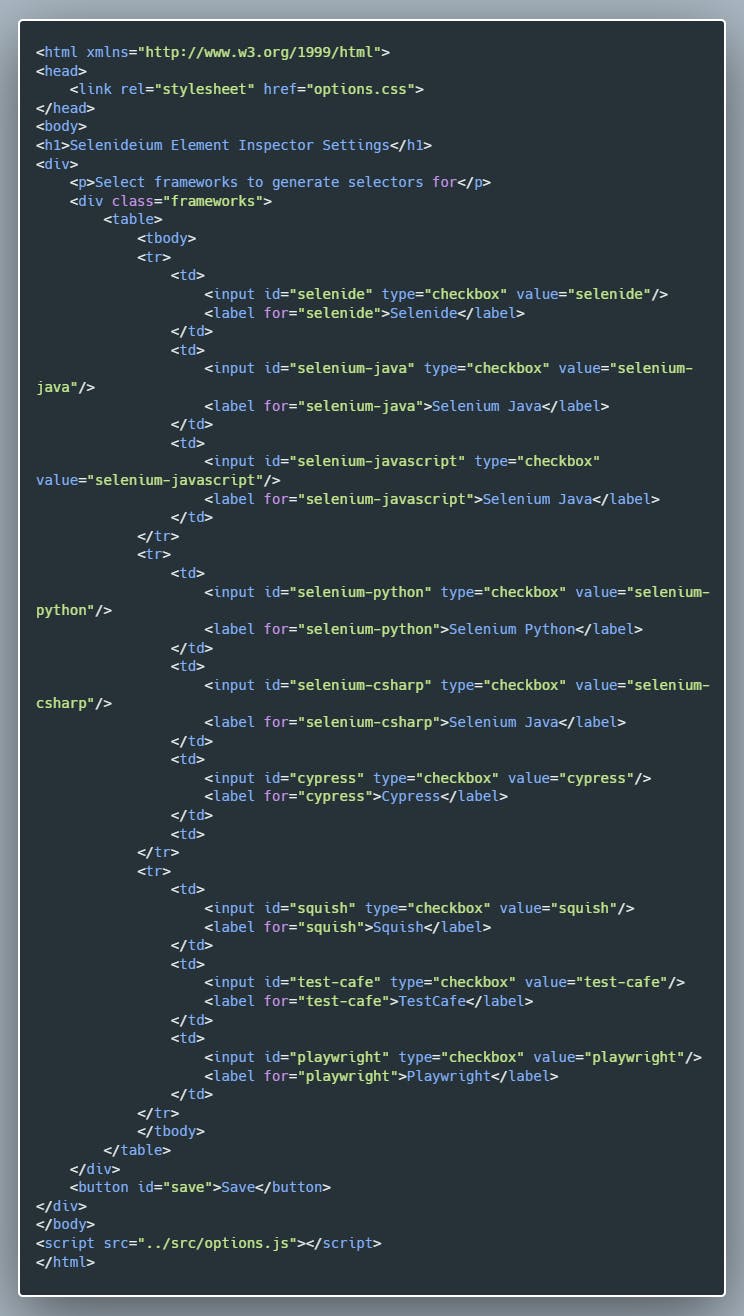
This is easy, here is the *options.html*:
In the end, I found out I accidentally stored the return value of one of the generator functions which stores the selectors and it has no return value.
Let's do something more interesting to close this article
## Configuring for which framework to generate selectors
As we have added Selenide, Selenium Java, Selenium Python, Selenium C#, Selenium JavaScript, Cypress, TestCafe and Playwright support we are logging too many selectors unnecessarily. In order to avoid that, let's make the frameworks selectable.
There are 3 steps we have to do:
- Create an options page and add checkboxes for the frameworks to the UI
- Store and load settings in chrome storage
- Log selectors only for the selected frameworksCreate an options page and add checkboxes for the frameworks to the UI
## Create an options page and add checkboxes for the frameworks to the UI
This is easy, here is the *options.html*:
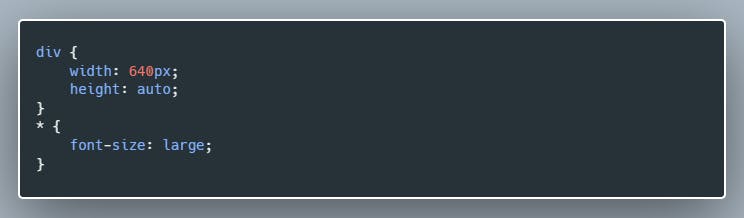
 We also need a small CSS file *options.css*:
 ## Store and load settings in chrome storage
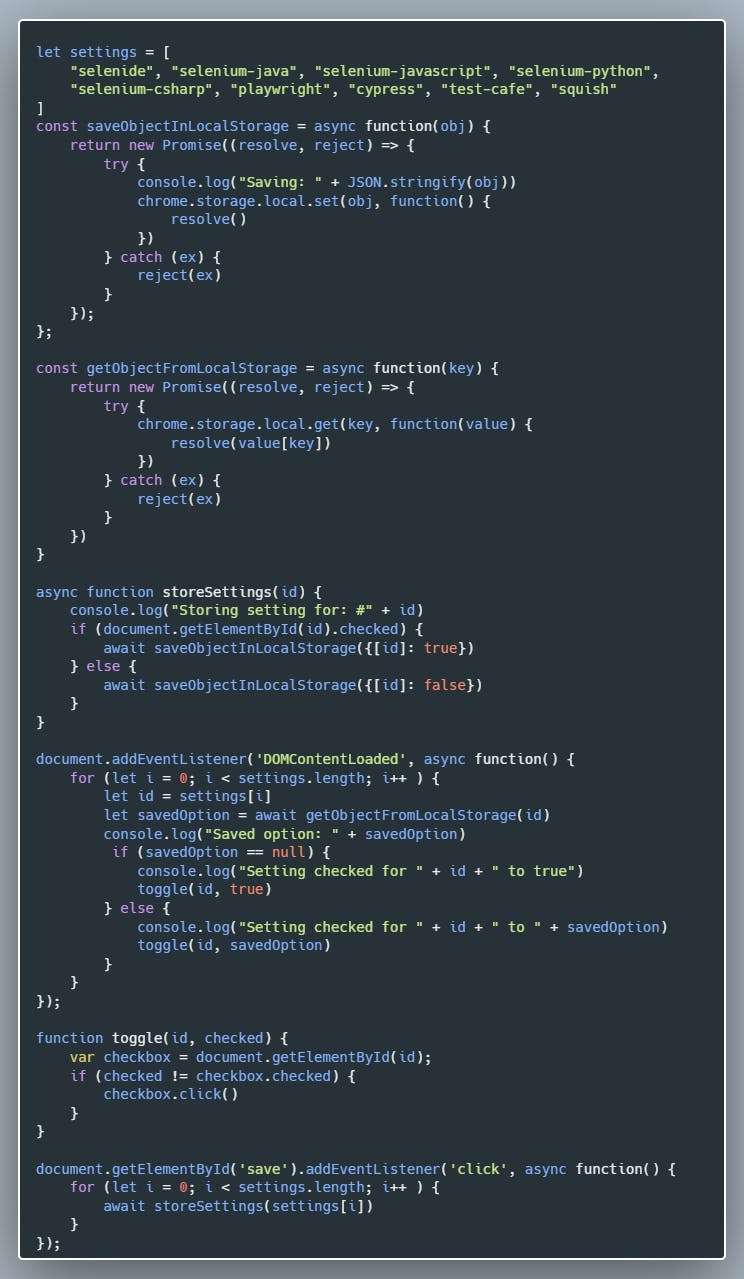
Well, this is tricky part number 1. It took me hours of trial and error and googling and also some help from my colleague [Zsolt Ilonca](https://www.linkedin.com/in/zsolt-ilonczai-801a44122/) to solve this. We did not really became friends with the assynchronity of JavaScript. To be honest, I am pretty sure the code could be much simpler, so please do not hesitate to share your improvement suggestions with me. 🙏
Basically what we are doing is restoring the settings from Chrome local storage on the DOMContentLoaded event and we are adding click event listeners for the inputs, based on which we update the local settings.
This is the *options.js* file:
## Store and load settings in chrome storage
Well, this is tricky part number 1. It took me hours of trial and error and googling and also some help from my colleague [Zsolt Ilonca](https://www.linkedin.com/in/zsolt-ilonczai-801a44122/) to solve this. We did not really became friends with the assynchronity of JavaScript. To be honest, I am pretty sure the code could be much simpler, so please do not hesitate to share your improvement suggestions with me. 🙏
Basically what we are doing is restoring the settings from Chrome local storage on the DOMContentLoaded event and we are adding click event listeners for the inputs, based on which we update the local settings.
This is the *options.js* file:
 Let's continue with the last step.
## Log selectors only for the selected frameworks
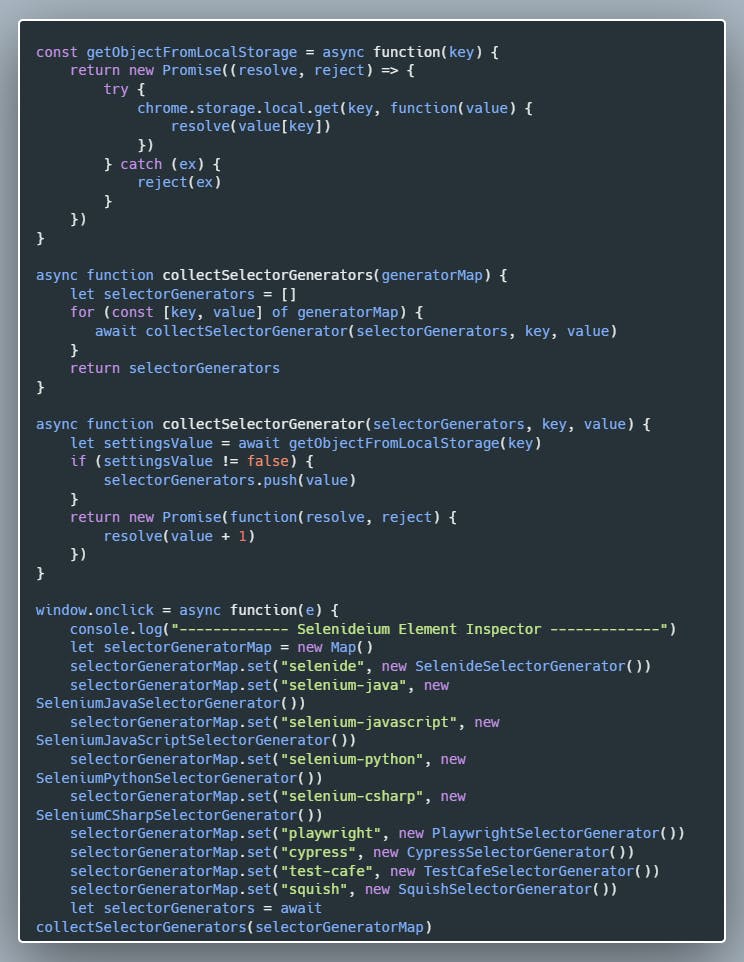
Here again, Javascript async/await tricked me so it again took me a few hours to implement this. Here is the relevant part of the *content.js* code:
Let's continue with the last step.
## Log selectors only for the selected frameworks
Here again, Javascript async/await tricked me so it again took me a few hours to implement this. Here is the relevant part of the *content.js* code:
 Aaaand we are done. It is time to submit the plugin into the Chrome Web Store and to wait a few days to be accepted, then I will immediately post this article. 😊
Download the plugin: [Selenideium Element Inspector](https://chrome.google.com/webstore/detail/selenideium-element-inspe/mgfhljklijclnfeglclagdeoiknnmnda/).
P.S.: **Thanks for sharing the article**. 👍
In case you do **not want to miss my posts**, just **follow me** [here on Hashnode](https://mszeles.com/), on [LinkedIn](https://www.linkedin.com/in/miklos-szeles/), on [Twitter](https://twitter.com/mszeles) on [Medium.com](https://medium.com/@mszeles), on [dev.to](https://dev.to/mszeles) and even on [Instagram](https://www.instagram.com/szelesmiki/). 😊
Aaaand we are done. It is time to submit the plugin into the Chrome Web Store and to wait a few days to be accepted, then I will immediately post this article. 😊
Download the plugin: [Selenideium Element Inspector](https://chrome.google.com/webstore/detail/selenideium-element-inspe/mgfhljklijclnfeglclagdeoiknnmnda/).
P.S.: **Thanks for sharing the article**. 👍
In case you do **not want to miss my posts**, just **follow me** [here on Hashnode](https://mszeles.com/), on [LinkedIn](https://www.linkedin.com/in/miklos-szeles/), on [Twitter](https://twitter.com/mszeles) on [Medium.com](https://medium.com/@mszeles), on [dev.to](https://dev.to/mszeles) and even on [Instagram](https://www.instagram.com/szelesmiki/). 😊
 📚**Join the Selenide community on** [LinkedIn](https://www.linkedin.com/groups/9154550/)! ✌